
Photo Guidelines for Vendor Listings
Great photos drive bookings. Travelers browse Dipsea visually — the quality of your photos is the single most important factor in how often your listing is clicked and booked. Follow these guidelines to make sure your photos display well on both mobile and desktop.
Technical Requirements
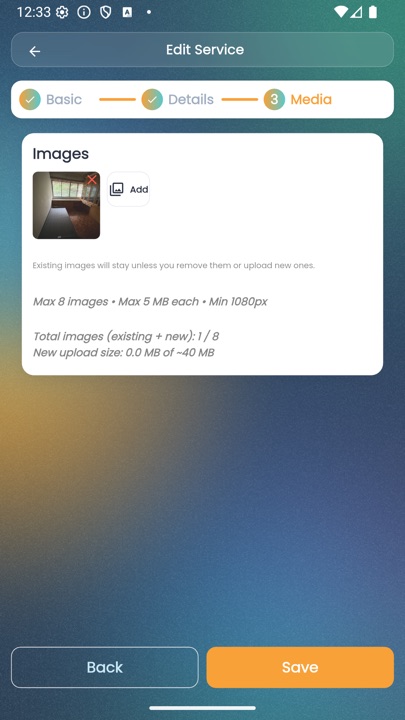
- Maximum 8 photos per listing
- Maximum file size: 5 MB per photo
- Minimum resolution: 1080 pixels wide (higher is better — we recommend 1920px or more)
- Accepted formats: JPG, PNG
- Landscape orientation is preferred — it crops better into cards and previews
What to Show
Different service types benefit from different shots. Aim to cover:
- Accommodation — exterior, bedroom, bathroom, common area, view from the balcony, surrounding area
- Activity / Day Trip — the activity in action with real guests, scenery, equipment, instructor
- Transport / Boat / Ferry — the vehicle itself, interior, boarding area, a shot of the route
- Rental — the equipment in good condition with scale reference
Tips for Better Photos
- Shoot during natural light — early morning and late afternoon give the best colors. Avoid direct midday sun if possible.
- Clean and stage the space — make beds, remove clutter, arrange towels, open curtains to let light in.
- Use a wide-angle lens — most smartphones have one built in. It makes rooms look more spacious.
- Shoot horizontally — most of our grid and card layouts are landscape.
- Avoid heavy filters — honest-looking photos build trust. Edit only for exposure and white balance.
- Include people where appropriate — a photo of real guests enjoying your activity converts better than empty scenery.
Ordering Your Photos
The first photo is your main image — it appears in search results, on your listing card, and in social share previews. Pick your strongest shot for the cover. For accommodation, this is usually the exterior or the most attractive bedroom. For activities, choose an action shot.
What to Avoid
- Watermarks, overlaid text, or contact details — Dipsea handles the booking
- Photos from other businesses or stock photography you don't have rights to use
- Dark, blurry, or heavily compressed images
- Photos of people without their permission, especially children
Updating Photos Later
You can add, reorder, or delete photos at any time from the Edit page of your listing. Seasonal changes (e.g. monsoon rainy views vs sunny peak season) are a good reason to rotate photos throughout the year.
Next Step
Ready to set your prices? Read the Pricing guide to understand how Dipsea's seasonal pricing works.